Quick actions
Most of what you'd reach for kubectl to do, Kubus does from a menu. Every list row has a
⋮ menu, and the same actions are available from the details drawer
and the command palette.
Actions only appear where they make sense. You'll never see Cordon on a ConfigMap. The drawer puts the most common ones in a labeled action bar: Logs, Shell and Forward for pods, Scale and Restart for workloads, Cordon and Drain for nodes, Edit data for ConfigMaps and Secrets. Kinds without any keep only the ⋮ menu, in the drawer's title row.
Workloads
| Action | Applies to | What it does |
|---|---|---|
| Rollout restart | Deployment, StatefulSet, DaemonSet | Triggers a rolling restart (like kubectl rollout restart). |
| Scale… | Deployment, StatefulSet, ReplicaSet | Set the replica count. Warns if an HPA/KEDA will fight you. |
| Pause / Resume rollout | Deployment | Freeze or resume the rollout. |
| Set image… | Deployment, StatefulSet, DaemonSet | Swap the image on any container or init container. |
| Restart pods… | ReplicaSet | Deletes the managed pods so they're recreated. |
| Re-run | Job | Creates a fresh Job from the same template. |
| Trigger now… | CronJob | Creates a Job immediately, off-schedule. The generated Job YAML is shown first for review and one-off edits. |
| Suspend / Resume | CronJob | Pause or resume scheduling. |
Scaling
The Scale dialog shows the current replica count and lets you set a new one. If a
HorizontalPodAutoscaler or KEDA ScaledObject targets the workload, Kubus warns you,
since the autoscaler will likely override a manual change.
To scale several Deployments or StatefulSets to the same count, tick them in the list and click Scale in the bar that opens above the list. The dialog lists every workload with its current and new replica count. Workloads an autoscaler manages are named in a warning and skipped, unless you tick Override the autoscaler on these too. Scaling running workloads on a protected cluster to zero asks you to type a confirmation first, as the single Scale dialog does.
Rollout history & rollback
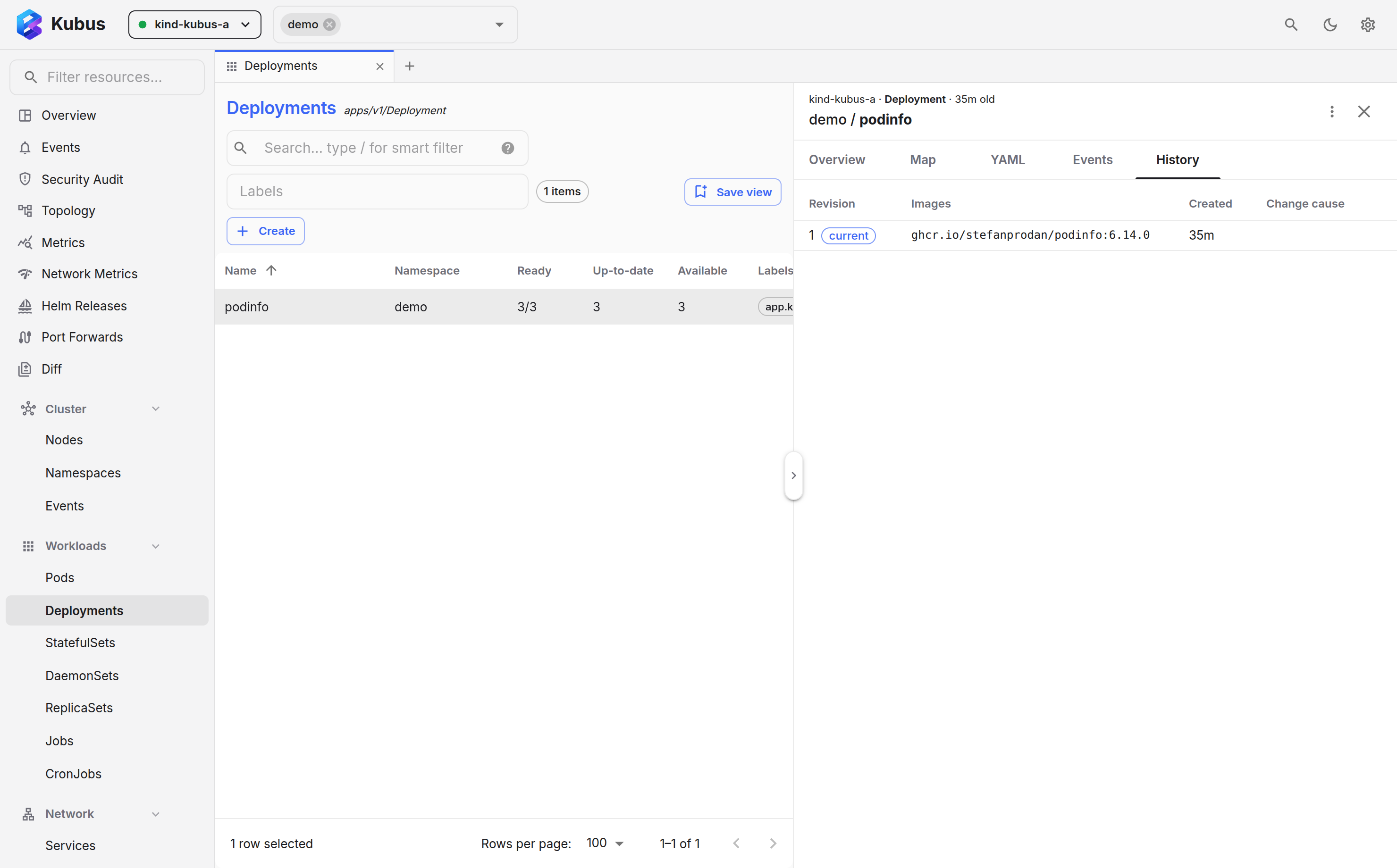
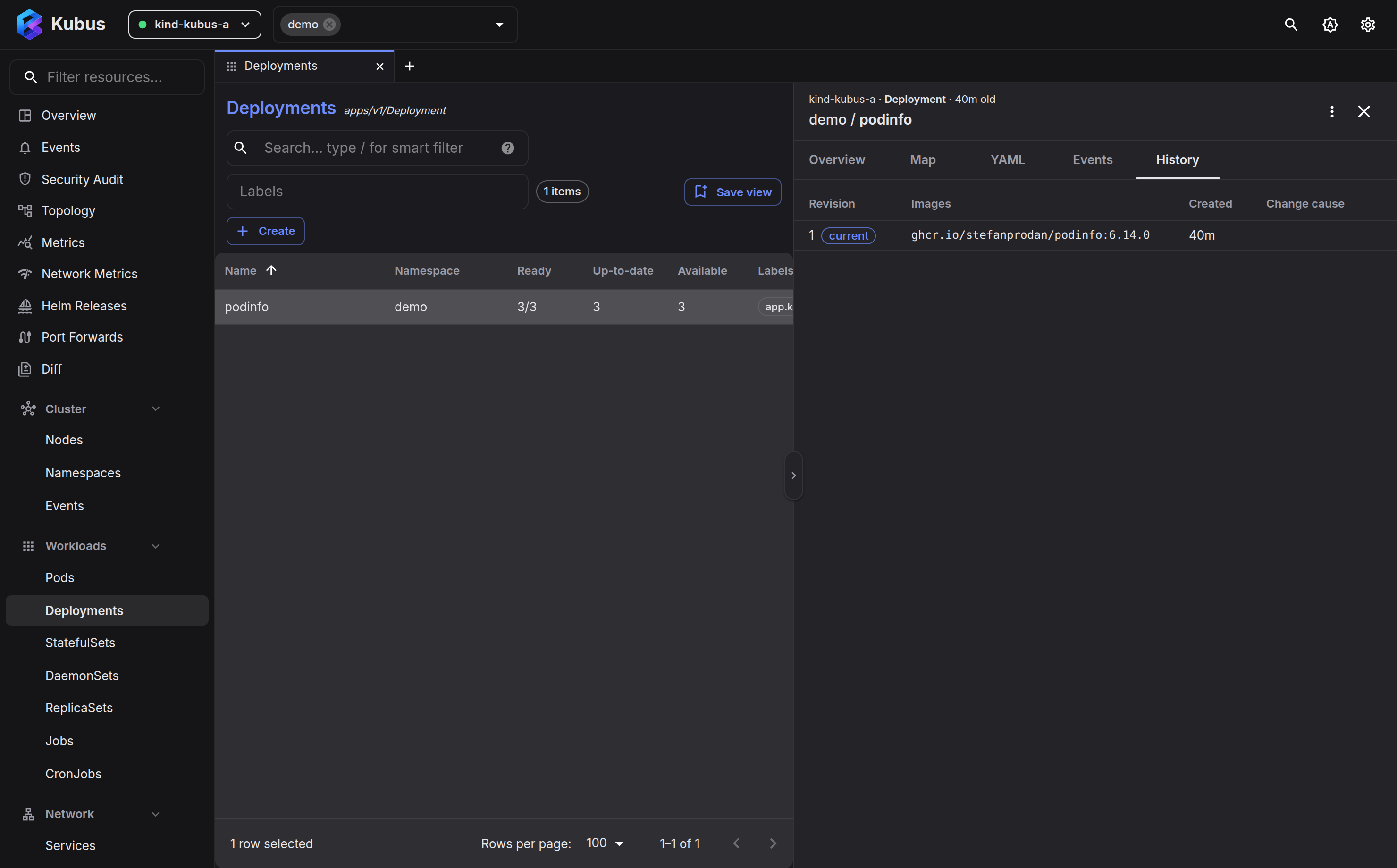
Open a Deployment, StatefulSet or DaemonSet's details drawer and switch to the History tab. You
get every revision with its images and change-cause, the current one clearly marked, and a
Roll back button on the others. It works like kubectl rollout undo, except that you
can see what you're rolling back to first.
Nodes
| Action | What it does |
|---|---|
| Cordon / Uncordon | Mark the node un/schedulable. |
| Drain… | Cordon, then evict all non-DaemonSet pods, with live progress (evicted X / Y). |
| Node shell… | Open a privileged root shell on the node. |
| Debug container… | Start a debug pod on the node with an image from the debug catalog. |
The Drain dialog streams progress as it evicts, so you can watch a node empty out in real time rather than staring at a spinner.
Operators
Custom resources of a few operators get their actions as labelled buttons in the details drawer. Each one makes the same change the operator's own tooling makes, so the controller picks it up exactly as it would from there.
| Action | Applies to | What it does |
|---|---|---|
| Sync… | Argo CD Application | Starts a sync of the tracked revision, like argocd app sync. Tick Prune to also delete resources that left the source. Refused while another operation runs. |
| Refresh | Argo CD Application | Asks Argo CD to compare against Git again now (the argocd.argoproj.io/refresh annotation). |
| Promote… | Argo Rollout | Resumes a paused canary at its next step, or switches a blue-green rollout to the preview. |
| Promote full… | Argo Rollout | Skips the remaining steps and makes the new revision stable. |
| Abort… / Retry… | Argo Rollout | Sends traffic back to the stable revision, or starts an aborted update again. |
| Force refresh | ExternalSecret | Syncs from the store now instead of at the next interval (the force-sync annotation). |
| Reconcile | Flux Kustomization, HelmRelease and sources | Asks Flux to reconcile now (the reconcile.fluxcd.io/requestedAt annotation). |
| Suspend… / Resume… | Flux Kustomization, HelmRelease and sources | Sets spec.suspend. Resuming also asks for a reconcile. |
Actions that change what runs ask for confirmation first, and on a protected cluster they want the object's name typed. Refresh and Reconcile only make the controller look again, so they run at once.
Everything: delete
Delete… is available on every kind. You'll always get a confirmation; on a protected cluster you'll be asked to type the resource name first, so a stray click can't take something down.
Destructive actions and the production guard
Delete, scale-to-zero, drain, cordon, node shell and node debug containers are gated by the production guard on clusters you mark as protected. The guard is a UI safety net against slips. It is not a server-side permission boundary, so for real authorization use Kubernetes RBAC.
Run actions from anywhere
- Row menu: the ⋮ on any list row.
- Details drawer: the same actions while you're inspecting an object.
- Command palette: press Ctrl+K, find a resource, press Tab and pick an action. More →
- Keyboard: focus a row in any list and press one key, for example
lfor logs,sto scale oreto open the manifest. The row menu prints each key next to its action, and you can press the key while the menu is open too. Restart and delete ask you to confirm first. All keys →
See also
- Logs show what a workload is doing before you act.
- Shell & debug gets you a terminal into a container or node.